Now let’s cover how to log in, check your statements, and access other resources.
You should have received an email with your login details for Capital Guardians, the platform we use to manage your funding and pay service providers. You can log into your account anytime via our website. You’ll find the log in link at the top of our website.
In your first month, no funds will be shown in your account. Funds will appear in the second month after we receive notification from Services Australia.
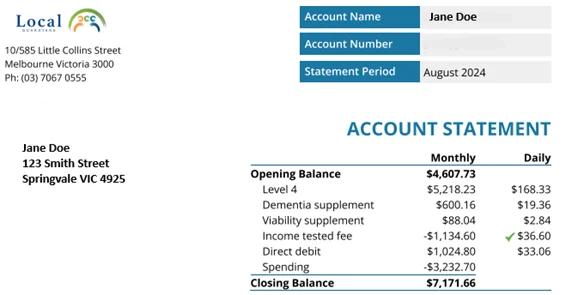
Your account will display your linked providers, available funds, and invoices in real-time. You’ll also receive a monthly statement in the first half of each month.

Reading your statement
Your statement includes several important figures that reflect your Support at Home funding balance and any contributions or subsidies received from the government. These figures are displayed both as a monthly total and daily amount. Click below to visit our website to learn more about your monthly statement.
Available Funds
Click below for information on why your statement balance drops at the start of a new month.
Income Tested Fee
An Income Tested Care Fee (ITF) is an additional contribution that some individuals may need to pay based on an income assessment conducted by Centrelink. It is advisable to determine if an ITF applies to you before deciding to accept Support at Home funding. You can find more information (including the maximum daily rate) below.
Plan Currency
Your Care Plan and Budget are dynamic documents that need updating whenever new services or expenses arise, there’s a change in funding level, or care needs shift significantly. According to the Aged Care Act, these documents should be renewed at least every 12 months. We will notify you when it’s time for a review to keep the plan aligned with your evolving needs.
Monthly check-ins will help ensure everything is working well and provide updates on any changes, incidents, or hospital visits.

Incident Reporting
It’s important for Local Guardians to know about any changes in circumstances, incidents, or hospital and respite visits. This information helps us provide appropriate support and mitigate potential risks.
If you’re unsure whether an incident is reportable, please complete our Incident Reporting Form. Your input is vital for maintaining a safe environment.
To provide guidance in an emergency, we recommend displaying the Escalation Process along with your Emergency Plan in a prominent position, ensuring that everyone involved is familiar with it for effective emergency management.

The Academy
The Academy is our free online training platform covering topics for older adults, their families, and caregivers. Topics include Falls Assessment, Medicine Management, Manual Handling, and Incontinence. We regularly update and add new modules.
The user-friendly design features clear information, short videos, and multiple-choice questions. Click below to visit and register. Please share this link with your providers so they can benefit from the training too.

Feedback
We value the opportunity to resolve concerns to prevent future issues and ensure a better experience for all clients. You’ll find our complaints policy here. We also promote a culture of excellence by recognising positive experiences.
We welcome your feedback, complaints, or compliments, which can be submitted in various ways:
1) Use this Complaints/ Feedback Link
2) Use this Compliments Link
3) Leave a Google review
4) Call (03) 7067 0555